-->
Showing posts with label zimo. Show all posts

Sunday, March 30, 2025

Fixing the test bench for DCC-EX and Roco/Zimo

In various past posts, I mentioned that I could not configure Roco engines with a Zimo decoder through DCC-EX and JMRI - even though it just worked fine for a Piko loco ... Overall, the DCC-EX command station wasn't very stable.

I thought that the wiring on the test bench could be the issue. Because of the rotary switches, it could be that the track 1 and 2 were actually connected to each other, or something like that.

I made one change by disconnecting the rotary switch for track 2; therefore track 2 is now directly connected to the programming track of the DCC-EX command station.


The green and blue wires come from the DCC-EX command station, whereas the red and black wires come from the rotary switch for track 2.

And it's now working as a charm! I need to find a better solution since now I cannot connect track 2 to the ESU LokProgrammer or the AUX.


Sunday, October 16, 2022

Setting DCC address for 4 engines


Continuing on the recent activities, I set up the digital address for 4 other models.


Mehano T285 7847 - HLD 7764

I set the address to #7764:


Roco 73664 - Traxx E 186 320-8 ECR

I set the address to #320:

This is DCC only - sadly ...


Os.Kar 1546 - BB 475410

I set the address to #7542, because there's already an identical model with address 7541:


LS Models 10071 - X 76599/76600 "Nord Pas-de-Calais"

I set the address to #7659:


Saturday, February 5, 2022

A better way to set a long address on a Roco engine


In a previous post, I described how to manually set a long address to a Roco engine that is equipped with a Zimo decoder. I found an easier way with DecoderPro from JMRI ...


The model


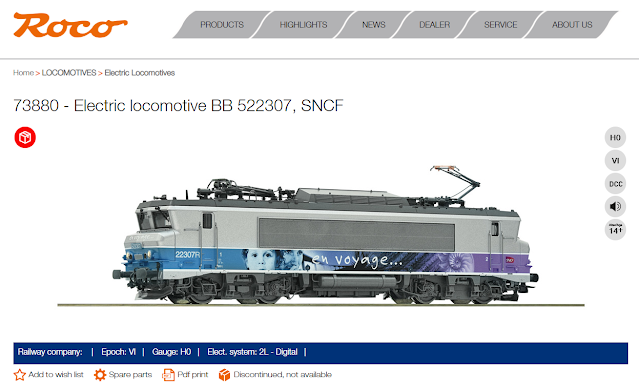
But first, let's have a look to the actual model. It's the reference 73880 and represents the BB 522307 from SNCF in its "En Voyage" livery.


https://www.roco.cc/en/product/236491-73880-0-0-0-0-0-002002-1/products.html


Some pictures of my model:


And the links to all the manuals:
  • Functions on the decoder - link
  • Sounds on the decoder - link
  • Operating manual - link
  • Spare parts - link


The decoder & JMRI


I installed DecoderPro from JMRI a while back, but never really got to it. I launched it because I'm curious on how to properly program a Zimo decoder. While I didn't go into the full configuration, I found that setting a long address was actually quite easy. 

Here are the steps:

  • Launch DecoderPro and click "New Loco":

  • In the new window, click "Read type from decoder":

  • The software automatically detects the type of decoder and pre-selects the possible options. I was not sure which one it was so I chose the one that seemed to be the generic one "MX645 version 37+":
  • In the new window, it's very easy to provide a long address and click "Write":


The ECoS


Now switching to the ECoS, it shows the correct address; so much easier than the previous method:


Sadly, I'm not certain the decoder supports RailCom because there are no icons, so I need to do this manually which is a bit tedious. I used another BB 22200 from Roco to adjust the engine profile:


And voilĂ !


Tuesday, September 28, 2021

Setting a long address on a Roco engine


Most Roco engines are fitted with a Zimo decoder. Those decoders are not supported by the ESU LokProgrammer software and it is therefore not very intuitive on how to change the address of a Roco engine. Here's how I do it.

I want to set engine BB 22332 - Roco 73878 to address 2232.


CV 17 & 18

 The long address is 4-digit long and stored in CV 17 and CV 18. I used the following calculator to compute the value for each CV: https://www.digitrax.com/support/cv/calculators/

For a long address of 2232, the values are:

  • CV 17 = 200
  • CV 18 = 184
I used the ESU LokProgrammer to "manually" write those CVs:


This step by itself is not enough. CV 29 also needs to be adjusted.

CV 29

In addition, bit 5 of CV 29 needs to be set to 1, so that the command station knows to use the long address instead of the short address stored in CV 1. CV 29 actually holds multiple settings, including the RailCom protocol. I used the following calculator: http://www.2mm.org.uk/articles/cv29%20calculator.htm

  • CV 29 = 46 (previous value was 14)


ESU ECoS

Once the CVs 17, 18, and 29 are written, I can bring the engine to the layout and use the ECoS to add the engine including all the different sounds and functions.